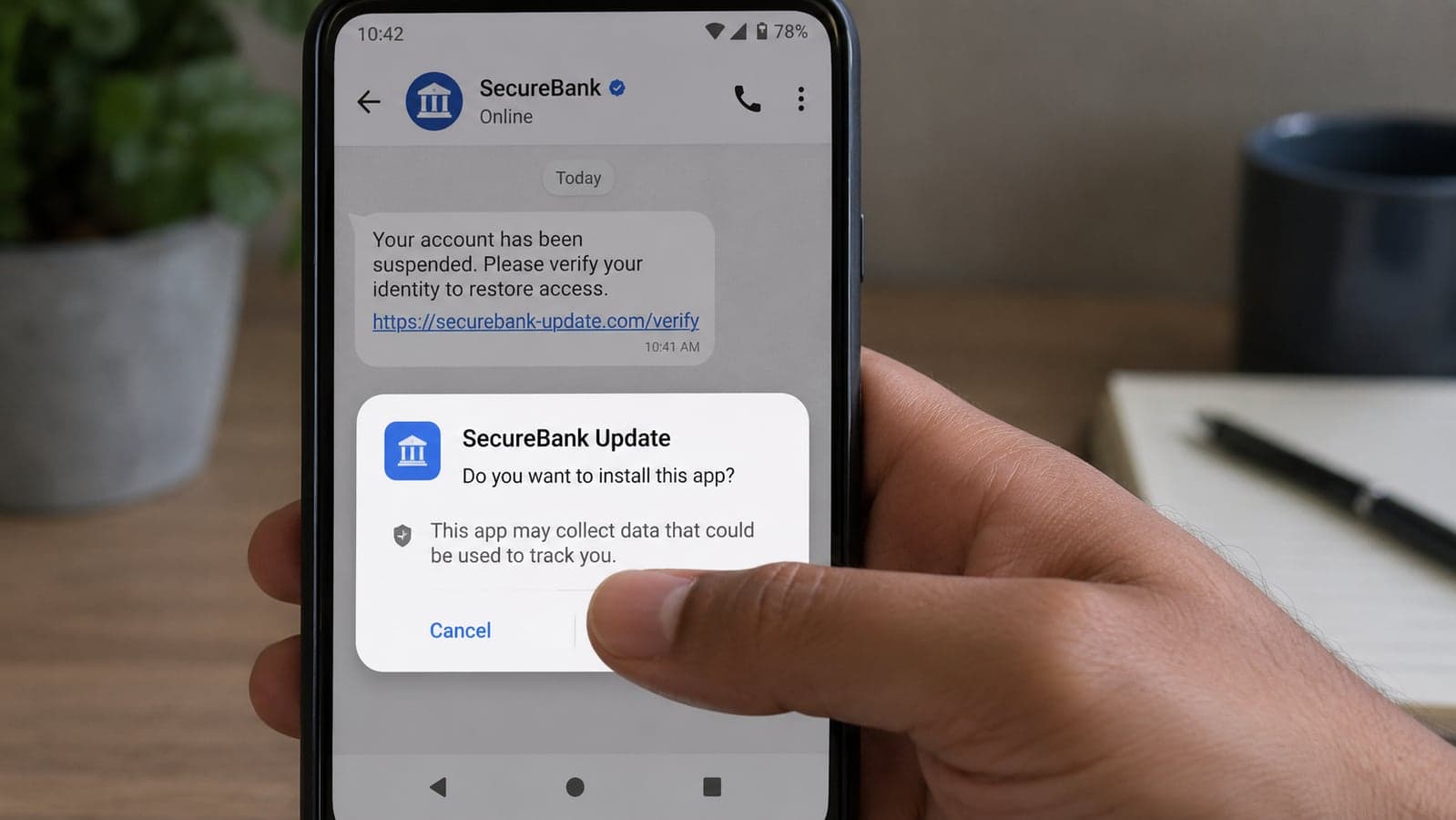
You Changed Your Gmail Password and They Were Still Inside. 2026 Account Takeovers Steal the Session, Not Just the Password

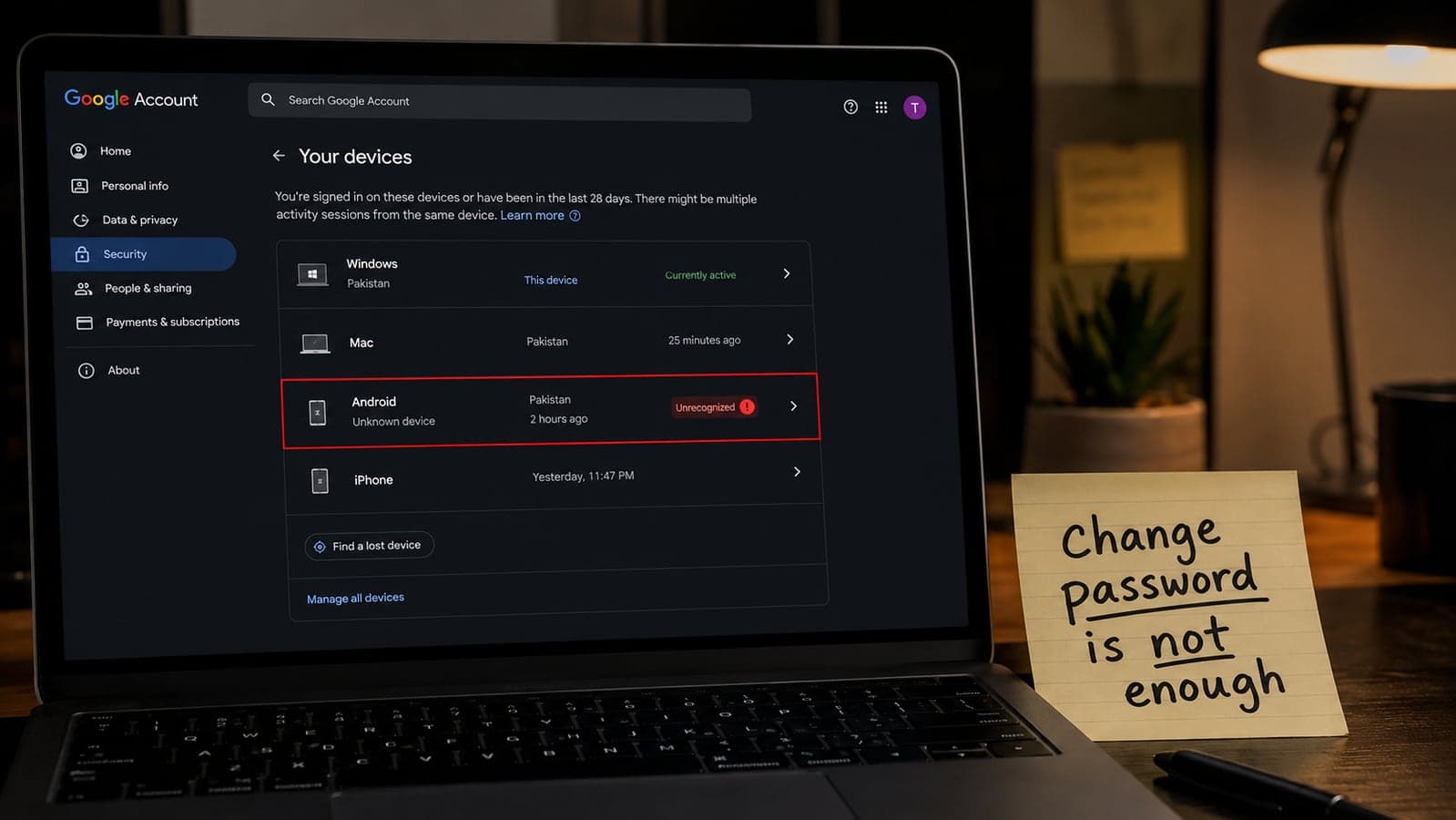
Most people who think their Google account was stolen do the same three things. They change the password. They turn on two-step verification, or confirm it is already on. They wait for the problem to go away.
Sometimes it does. In 2026, often it does not.
On 8 June, Google's Trust & Safety team published its latest frauds-and-scams advisory. Buried in the first section is the sentence that should have rewritten every "how to recover Gmail" page on the internet: attackers are mirroring legitimate login flows in order to capture both the password and the session cookie, bypassing multi-factor authentication. The industry name is adversary-in-the-middle. The practical translation is uglier. You typed the code. Google accepted it. Someone else kept the ticket that says you are signed in.
That is why a password change can feel like it worked for an hour and then fail. The password is new. The stolen session is still valid until it is killed. If the thief also added a recovery phone, a mail-forwarding rule, or a Gmail delegate while they were inside, they can walk back in after you slam the front door.
This guide is written for the searches that never go away — Google account hacked, someone else is using my Gmail, emails disappearing, password changed but still locked out — and for the 2026 methods that older posts still treat as science fiction. It follows Google's own recovery order. It does not invent panic, and it does not tell you how to attack anyone. If a stranger on the phone offers to "recover Gmail for a fee," skip to the last section before you pay them. Google says it does not work with those people.
First: are you actually compromised, or just spooked?
Google publishes a long list of signs. Not every item on it is a break-in. A new phone, a hotel Wi-Fi login, a factory reset, or an app that checks Gmail in the background can look like a stranger. Treat the following as act now, not as "maybe later":
- A recovery phone or recovery email you did not add
- The name on the Google Account changed
- 2-Step Verification switched off, or a new second-step method you did not enrol
- Gmail forwarding to an address you do not recognise
- Filters that auto-delete or auto-forward mail you never created
- A Gmail delegate (another person with access) you did not invite
- Sent mail you did not write; friends reporting spam from you
- Mail vanishing and not sitting in Trash
- Unknown devices on google.com/devices that are not your laptop, phone, or tablet
- Google Ads, Google Pay, or Play charges you did not make
- A red bar that says Google detected suspicious activity — take that one at face value
If you cannot sign in at all because the password or recovery number was changed, do not keep guessing on a phishing page. Type accounts.google.com yourself, or use Google's account recovery flow from a device you already trust. Google's help centre is explicit: you cannot call Google to be let back in, and Google does not partner with any "password support" service. Anyone who claims otherwise is running a second scam on top of the first.
How 2026 takeovers actually start (without the thriller version)
The password-guessing era is not over. Reused passwords still work. What changed is the professional kit sitting on top of phishing.
The fake login that waits for your 2FA. Google's June advisory describes adversary-in-the-middle and QR-code phishing ("quishing") as the evolved form of email phishing. You land on a page that looks like Google, Microsoft, a bank, or a delivery firm. You complete the extra step. The kit copies the session that the real site just issued. Two-factor did not fail. It was used in front of the thief. Google notes that these kits still thrive even after actions against well-known phishing-as-a-service brands, and that attackers host pieces of the lure on reputable cloud properties so scanners hesitate.
Google's consumer advice for this class of attack is the same habit we keep repeating on this site for shops and banks: do not use the link in the message. Type the address you already know. Do not scan a QR code from an unexpected email with your personal phone. Do not call a number printed in the same notification.
The calendar invite that is really a bill. The same advisory says Google investigated "calendar phishing": fake renewal or payment notices dropped straight into Google Calendar invites, so they appear as events rather than as junk mail. People trust their own calendar more than their inbox. That is the point. Open suspicious events, do not click the "pay now" button inside them, and remove the invite. If a subscription is genuinely due, open the vendor's app or type their site yourself.
ClickFix: the page that tells you to paste a command. Google describes a campaign that uses fake "browser update" lures, including pages hosted on Google Sites, to get people to paste a command into their own computer. The user is doing the installation. Antivirus is late. Google's line is blunt: never copy and paste unknown code from an online tutorial or a popup into a terminal. If Chrome needs an update, it updates from inside Chrome, not from a webpage yelling at you. This week's Chrome 152 release — more than 300 security fixes, ten of them critical, according to Google's announcement as reported by SecurityWeek and Malwarebytes — is a reminder to let the browser patch itself, not a reason to run a stranger's command.
The "police" call that demands a fee. Google says impersonation of police and labour ministries is active across South Asia, Southeast Asia, and GCC countries, including India, Singapore, Oman, and the UAE: lookalike Gmail addresses, a calendar or Meet invite, then a high-pressure voice or video call sometimes described as a "digital arrest." The safety tip is not subtle. Real departments do not collect "legal fees" or banking passwords over WhatsApp, Telegram, or a random Meet link from a personal Gmail address. You can restrict Google Meet so only contacts can call you. If you are in Pakistan or anywhere else this pattern is common, treat unsolicited "cyber cell" and "FIA" messages the same way — hang up, look up the agency yourself, and never install an APK they send. We covered the Android sideload version of that trick in our fake bank-app guide.
Google also cited the Nasdaq Global Financial Crime Report's estimate of nearly $580 billion in global fraud losses for 2025, and surveys suggesting roughly one in five adults have been scam victims. Those are industry-wide figures, not a claim that your inbox is doomed. They are why this topic stays searched in January as hard as it is searched in August.
If you can still sign in: lock it down in this order
Use a computer or phone you believe is clean. A stolen session plus malware on the same laptop is a revolving door. If you recently installed a "helper" APK, a fake Chrome update, or a loan app that wanted SMS and Accessibility, fix the device first (airplane mode, uninstall, then continue from another machine if you have one).
Google's official sequence is sign in → review activity and devices → harden the account. Here it is in the order that actually cuts the thief off, with the Gmail traps older checklists skip.
1. Change the Google password — then assume it is not enough
Do this immediately if you think someone else is signed in, as Google instructs. Then change the password on every site where you reused that password, and anywhere you sign in with that Gmail address. A password manager helps because humans reuse. If Chrome saved cards, review them after the account is stable.
Changing the password invalidates many sessions. It does not magically delete a forwarding rule, a delegate, or a recovery number the attacker added. Keep going.
2. Sign out the devices that are not yours
Go to google.com/devices (or Google Account → Security & sign-in → Manage all devices). Sign out anything you do not recognise. If the same device name appears more than once, Google notes those sessions might be one machine or several — sign out all of them if you are unsure. Factory-reset phones and old library logins can linger; when in doubt, sign them out. You can sign back in on your real hardware in two minutes. A stranger's session can empty a business.
3. Review Recent security activity and say so when it was not you
Google Account → Security & sign-in → Review security events. For anything that was not you, choose the option that it was not you and finish Google's guided repair. That flow exists because a password change alone is incomplete.
4. Take back recovery: phone, email, passkeys, 2-Step methods
Attackers who plan to stay will plant a recovery number they control. Check recovery phone, recovery email, alternate contact email, and the name on the account. Remove what you did not add. Turn 2-Step Verification on if it is off. Prefer Google prompts or an authenticator app over SMS where you can — SIM-swap is still a real industry. Add a passkey on a device you own; Google treats a passkey as possession of that device, which is the point of the wider passkey shift. Review "apps with access" and revoke anything you do not recognise. Turn off "less secure app access" if it is somehow still on.
Google may flag a newly added sign-in method as at-risk and give you a window (its help pages describe 30 days in some cases) to confirm it. Do not ignore those emails. Confirm your own methods; let Google drop the ones you did not add.
5. Gmail: this is where quiet theft lives
Open Gmail on the web → Settings (see all) and hunt for settings you did not create. Google's own list is the right checklist:
- Forwarding and POP/IMAP — disable forwarding you did not set; be suspicious of IMAP/POP if you never used a desktop mail app
- Filters and Blocked Addresses — rules that send mail to Trash, to a label you never open, or to another address
- Accounts and Import — "Grant access to your account" (delegates)
- Vacation responder, display name, "send mail as," scheduled send
A forwarding rule is why victims say "I changed the password, but they still get my mail." The inbox looks normal on your phone because copies are leaving by a different door.
6. Drive, Photos, Pay, Ads, YouTube
Drive: unexpected sharing, missing files (Google documents a recovery path for recently deleted files). Photos: albums shared with a partner you did not add. Google Pay and Play: unknown payment methods and purchases — use Google's official report-charge flows, not a chat support pop-up. Ads: unknown managers, spend spikes, ads pointing at stranger URLs. YouTube: videos or channel-name changes you did not make. Location sharing you did not turn on: switch it off.
7. Chrome on that computer
Google's compromised-account page tells people to remove extensions they do not recognise and update Chrome. Do both. A malicious extension can read mail after you "fixed" the password. Updating is not optional theatre: Chrome 152, rolling out this month, patched hundreds of flaws, including critical bugs that researchers said could be triggered by visiting a crafted page. Use Chrome's own About Chrome page. Close any tab that says "paste this command to continue."
If you cannot sign in
Use Google's account recovery page from a familiar device and network when you can. Answer what you actually remember. Recovery is slower when the attacker changed the phone number; that is by design. There is no legitimate shortcut via a freelancer on Instagram.
If recovery fails, use a different device you still control, wait out Google's security delays rather than hammering guesses, and stop entering codes into pages that arrived by SMS. Once you are back in, run the full list above in one sitting. Then tell your bank if Google Pay or saved cards were in the account, using the number on the card.
If this is a business Google login, you are not "just" recovering email
One Google Account can be Gmail, Drive, Calendar, Google Ads, Google Business Profile, Search Console, YouTube, Play Console, and the mailbox customers write to. A session thief who lasts overnight can:
- add themselves as an Ads manager and drain budget
- change the Business Profile phone number to a call-forwarding scam
- verify Search Console on a lookalike domain
- export Drive folders of invoices and contracts
- set forwarding so every customer complaint still "arrives" while a copy goes to them
After the personal lock-down, review users and managers in Ads and Business Profile, check Search Console property owners, rotate any API keys or OAuth apps tied to that login, and assume shared Drive links were seen. Staff should not complete 2FA for "Google support" on a phone call. If you use Google Workspace, tell an administrator through a known channel — not through the same inbox that may still be forwarding.
This is also why we tell clients to separate "the founder's personal Gmail" from the company's Workspace and from advertising logins. Convenience is how a household password becomes a five-figure Ads problem.
Stopping the next one (the part that actually reduces volume)
You will not outsmart every kit. You can refuse the three behaviours they need.
Type the destination. Banks, Google, Microsoft, Facebook, tax sites, hosting panels — if a message created the urgency, the link is untrusted. The same rule beat fake storefronts in our shopping-scam checklist and beat fake bank APKs. Calendar invites and Meet links from unknown Gmails get the same treatment.
Do not complete the scavenger hunt. No QR from an unexpected email. No "fix" that requires pasting into Terminal, Run, or PowerShell. No Chrome update from a full-screen alert. No APK from a "cybercrime officer."
Make the second factor something they cannot relay as easily. Passkeys and Google prompts beat SMS when you have the choice. Keep recovery information yours, and look at google.com/devices when you travel or buy a phone — it takes a minute, and it is how quiet sessions show up.
If you let Gemini or any other browser agent use signed-in tabs, treat a suspected compromise as a reason to revoke those permissions until the account is clean. An agent with your session is another pair of hands; we mapped that risk in the Chrome Auto Browse guide.
What not to do
Do not pay a recovery wizard. Google's help page states it does not work with services that claim to provide account or password support, and you should not give out passwords or verification codes to them.
Do not factory-reset your only phone as the first step if you still need that phone to receive Google's own prompts — unless you believe the phone itself is the malware host. Uninstall the bad app first. Reset later if the device still misbehaves.
Do not post your recovery codes in a screenshot "for a friend to help."
Do not assume 2FA means you can click every link again. In the attack Google described, 2FA is what the kit was waiting for.
Keep this page for the day it is not theoretical
Search interest in hacked Google accounts does not spike because of a single press release. It spikes because someone cannot open Gmail on a Tuesday. The 2026 detail worth remembering is small: the session can be stolen after you authenticate. Password and 2FA are still necessary. They are no longer the whole job. Kill devices, kill forwarding, kill delegates, take back recovery, update the browser, and never finish a login that began in a message you did not expect.
If a company Google login was used for ads, the public business listing, or customer mail, and you are not sure what the attacker could have changed, that is a containment problem as much as a password problem. Taylance Tech helps teams separate personal and business identities, put sensible 2FA and passkeys in place, and review the admin surfaces that actually move money. Send a short note — say what products are on the account. We will tell you the review order before we talk about any build work.
Recovery steps follow Google Account Help ("Secure a hacked or compromised Google Account" and related device and 2-Step Verification articles) as of 29 August 2026. Attack descriptions and the $580 billion / "one in five adults" figures are from Google's 8 June 2026 frauds and scams advisory (Nasdaq Global Financial Crime Report cited therein) and Google's published safety tips. Chrome 152 patch counts follow Google's stable-channel notes as reported by SecurityWeek and Malwarebytes in August 2026. Google has not claimed every unpatched browser is actively exploited; this is not a diagnosis of any reader's account. Feature names and menus move — if a label differs, search the setting inside Google Account rather than following a third-party "support" link.
FAQ
Frequently Asked Questions
Quick answers to common questions about this topic.
How do I know if my Google account is hacked?
Google's own warning signs include a recovery phone or email you did not add, 2-Step Verification turned off or altered, Gmail forwarding or filters you did not create, a mail delegate you did not invite, sent mail you did not write, missing mail not in Trash, unknown devices at google.com/devices, and charges on Google Pay, Play, or Ads you did not make. A red "suspicious activity" bar should be treated as real. A single unfamiliar location can be you while traveling or a background app — combine signals before you panic, but act immediately on recovery-method changes and forwarding.
I use 2FA. Can my Gmail still be taken over?
Yes. Google's June 2026 scam advisory describes adversary-in-the-middle phishing that copies a real login page, lets you complete multi-factor authentication, then steals the session cookie issued after you succeed. Two-factor worked; the thief reused the signed-in session. That is why you must also sign out unknown devices, remove forwarding and delegates, and never finish a Google login that started from an unexpected email, QR code, or calendar invite.
What should I do first if I can still open Gmail?
Use a device you trust. Change the Google password, then open google.com/devices and sign out of sessions you do not recognise. Review Recent security activity and mark events that were not you. Check recovery phone and email, apps with account access, and Gmail settings for forwarding, filters, and delegates. Update Chrome in the browser and remove any unknown extensions. Then change passwords on other sites that shared that password or that Gmail address.
What if I cannot sign in because they changed my password?
Type accounts.google.com yourself and use Google's official account recovery. Google states that you cannot call Google for sign-in help and that it does not work with third-party password-recovery services. Do not pay anyone who offers to unlock the account. After you get in, run the full device recovery, Gmail forwarding, and app-access review in one sitting.
What is calendar phishing or ClickFix?
In Google's June 2026 advisory, calendar phishing refers to fake payment or renewal notices embedded in Google Calendar invites to make them appear like real events. ClickFix uses fake browser-update or "fix this error" pages — including some hosted on familiar cloud sites — to persuade you to paste a command into your own computer. Do not click pay buttons inside surprise calendar events; type the vendor's site. Do not paste commands from popups. Update Chrome from Chrome's own settings.
My business runs Google Ads and a Business Profile on the same login. What else should I check?
After securing sign-in, review Ads users and managers, Business Profile managers and the public phone number, Search Console owners, Drive sharing, and any OAuth apps or API keys tied to that Google account. An attacker who keeps a session can spend ads, reroute customer calls, or copy files without changing your password again. Separate personal Gmail from Workspace and advertising admin accounts so that one household compromise does not affect the whole company.
 Tayyab Aslam