AI Agents for Small Business in 2026: What Actually Works, Real Costs & What to Skip

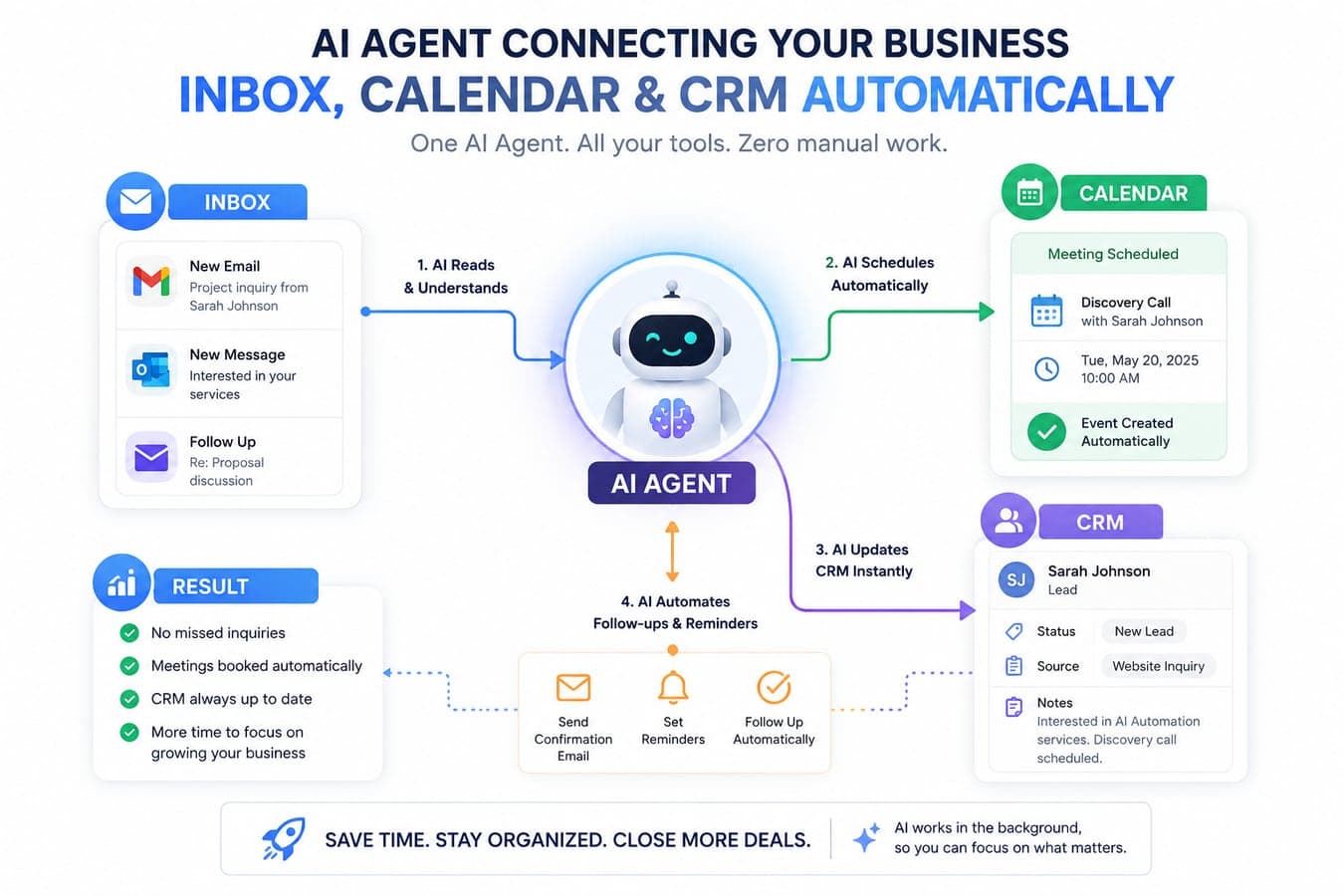
In 2024, "AI for business" meant a chatbot that answered FAQs. In 2026, it means something very different: AI agents that take actions — software that reads an incoming email, checks your inventory, drafts the reply, updates your CRM, and books the follow-up call without a human touching any of it.
The numbers behind this shift are hard to ignore. Small businesses are now adopting AI faster than enterprises — a reversal that had never appeared in Federal Reserve monitoring data before 2025. Adoption among companies with 10–100 employees jumped from 47% to 68% in a single year, and the typical AI-using small business now runs a stack of about five AI tools.
But here's the part most articles skip: Gartner also predicts that over 40% of agentic AI projects will be cancelled by end of 2027 — killed by escalating costs, unclear business value, or poor scoping. So the real question for a small business in 2026 isn't "should we use AI agents?" It's "which agent, for which job, at what cost — and what should we deliberately skip?"
We build AI automation systems for clients at Taylance Tech, and we use agents inside our own products. This guide is the advice we give paying clients — including the honest parts about where agents fail.
What Is an AI Agent (and How Is It Different From a Chatbot)?
A quick definition, because the marketing around this term has gotten sloppy:
- A chatbot answers questions. It's reactive. You ask, it responds, done.
- An AI workflow follows a fixed script: "when a form is submitted, send this email." Useful, but rigid.
- An AI agent is given a goal and a set of tools (your inbox, your calendar, your CRM, your database), and it decides the steps itself. It can handle the messy middle — the customer who asks three questions in one email, the invoice that doesn't match the purchase order.
That last capability — handling ambiguity across multiple steps — is why agents are displacing both chatbots and rigid automation in 2026. It's also why they're harder to deploy well.
The 5 AI Agent Use Cases That Actually Pay Back for Small Businesses
Industry data across 2025–2026 consistently shows the same pattern: companies deploying agents report roughly 66% productivity gains and 57% cost savings in the functions where agents run (PwC AI Agent Survey), and median payback time across functions is about 5 months — faster for sales and support, slower for finance and operations. Here's where the returns concentrate.
1. Customer Service & Support (fastest ROI)
This is where nearly every small business should start. Benchmark data from 2026 puts the cost of an AI-resolved support ticket at roughly $0.46 versus $4.18 for a human-handled one — about a 9× cost reduction — with modern agents resolving 60–70% of first-contact queries end-to-end.
What "agent" means here in practice: it doesn't just answer "where's my order?" — it looks up the order in your system, checks the courier status, issues the response, and escalates to a human only when confidence is low. For a business handling 50–100 queries a day, this alone usually justifies the entire AI budget.
2. Sales Follow-Up & Lead Qualification
SDR-style agents show the fastest payback of any category — around 3.4 months in 2026 benchmark surveys. The reason is simple math: most small businesses lose deals not to competitors but to slow follow-up. An agent that responds to every inbound lead within 60 seconds, asks two qualifying questions, and books a call directly into your calendar converts leads that would otherwise go cold overnight.
3. Back-Office Admin: Invoicing, Scheduling, Data Entry
The least glamorous category and the most quietly transformative. Productivity surveys show AI admin tools save small business owners 3–7 hours per week — invoice drafting, meeting notes, document summarization, appointment scheduling. If you're a consultant, clinic, agency, or trades business spending Sunday evenings on admin, this is the category built for you.
4. Content & Marketing Operations
Still the most-adopted category (around 71% of AI-using small businesses), but the 2026 upgrade is agentic: instead of "write me a post," an agent monitors your niche, drafts the week's content calendar, adapts each piece per platform, and queues it for your approval. Marketing is consistently where small businesses report the clearest, fastest measurable return.
5. Internal Data & Reporting
"How did we do last month?" shouldn't require exporting three CSVs. Data analysis and report generation is one of the highest-impact agent use cases in 2026 enterprise surveys (cited by 60% of organizations), and the same pattern is arriving in small business tools: an agent connected to your sales and accounting data that answers plain-English questions with real numbers. We built exactly this pattern into Tillqorin, our commerce OS — revenue, expense, and profit trends surfaced automatically instead of assembled manually.
What AI Agents Actually Cost a Small Business in 2026
Realistic monthly numbers, not vendor marketing:
- Starter (off-the-shelf tools): $50–$200/month. One or two SaaS agent tools — an AI support widget, an AI scheduler. No developer needed. This is where 80% of small businesses should begin.
- Operational stack: $200–$500/month. The median AI-using small business now runs ~5 tools covering support, content, scheduling, and analytics. Payback for well-chosen tools typically lands within weeks.
- Custom agent build: $3,000–$25,000 one-time plus $100–$500/month in API and hosting costs. Worth it only when an agent must work across your specific systems — your database, your ERP, your customer data — in ways no off-the-shelf tool supports. This is the tier where you hire a studio like ours, and we'll be honest: most businesses don't need it on day one.
Build vs. Buy: The 3-Question Test
Before any client project, we ask three questions:
- Does an off-the-shelf tool already do 80% of this? If yes, buy it. The market matured fast — don't pay custom prices for solved problems.
- Is the workflow specific to your business's data and systems? If your agent must read your inventory, your pricing rules, your customer history — that's when custom development earns its cost.
- Can you measure success with one number? Response time, tickets resolved, hours saved, leads booked. If you can't name the metric, you're not ready to build. This single filter would prevent most of the 40% of agent projects Gartner expects to fail.
What We Learned Deploying Agents in Our Own Products
Before recommending any of this to clients, we ran it on ourselves. Three lessons from our own builds that you won't find in vendor case studies:
The agent is only as good as the schema underneath it. When we added automated analytics to Tillqorin, the hard work wasn't the AI — it was making sure sales, purchases, and expense records were structured consistently enough that an automated system could reason over them without producing confident nonsense. Budget more time for your data model than for the AI itself.
Confidence thresholds beat full autonomy. In our support and content workflows, the pattern that survived was "agent drafts, human approves" for anything customer-facing, with full autonomy only for internal, reversible actions. Every time we skipped that staging step, we paid for it in cleanup.
The 20% edge cases eat 80% of the effort. Getting an agent to handle the common case takes a weekend. Getting it to gracefully hand off the weird cases — the refund that spans two invoices, the customer writing in mixed languages — is the actual project. Scope and price accordingly.
Why AI Agent Projects Fail (Learn From the 40%)
The failure data is consistent across surveys: 46% cite integration with existing systems as the primary obstacle, 42% data access and quality, 43% implementation cost. Small businesses face one extra barrier the enterprises don't: 51% report employee resistance and training gaps as a major hurdle.
Translated into plain advice:
- Start narrow. One agent, one job, one metric. "Automate everything" is how projects die.
- Fix your data first. An agent connected to a messy, out-of-date system automates the mess. If your product catalog or customer records are chaos, clean them before you deploy anything.
- Keep a human in the loop for the first 90 days. Let the agent draft; let a person approve. Expand autonomy only after you've watched it be right consistently.
- Bring your team along. Position the agent as removing the work people hate, not the people. Adoption resistance kills more SMB projects than technology does.
Your First AI Agent: A 30-Day Plan
Week 1 — Pick the one job. Track where time actually goes for one week. Choose the single most repetitive, rule-heavy task with clear inputs and outputs. For most businesses that's customer support or lead follow-up.
Week 2 — Buy before you build. Trial two or three off-the-shelf tools for that job. Connect one to your real systems in a limited mode (e.g., the agent drafts replies but doesn't send them).
Week 3 — Run it with human review. Every agent output gets approved by a person. Log where it's right, where it's wrong, and why. This week tells you whether your data and processes are agent-ready.
Week 4 — Measure and decide. Compare against your one metric from Week 1. If it's working, expand autonomy gradually. If the off-the-shelf tool hit a wall because your workflow is too specific — that's the moment to scope a custom build, and now you'll scope it with real evidence instead of guesses.
The Bottom Line
AI agents in 2026 are past the hype phase and into the operating phase — more than half of organizations now deploy agents in multi-step workflows, and small businesses are adopting faster than enterprises for the first time on record. The winners aren't the businesses with the most AI. They're the ones that picked one narrow, measurable job, deployed a focused agent, and expanded from evidence.
If your workflow is too specific for off-the-shelf tools — if the agent needs to live inside your systems and speak your business's language — that's the work we do. Tell us what you're trying to automate and we'll give you an honest read on whether you should buy a tool or build one, including when the answer is "don't hire us, just use the $50/month tool."
Frequently Asked Questions
What is the difference between an AI agent and a chatbot?
A chatbot answers questions reactively. An AI agent is given a goal and tools (your inbox, CRM, calendar, database) and decides the steps itself — it can look up an order, draft the reply, update records, and schedule a follow-up in one flow, escalating to a human only when needed.
How much do AI agents cost for a small business?
Off-the-shelf agent tools run $50–$200/month per tool, and a full operational stack typically costs $200–$500/month. Custom-built agents that integrate with your specific systems range from $3,000–$25,000 one-time plus ongoing API costs of $100–$500/month.
Which AI agent use case has the fastest ROI?
Sales follow-up agents show the fastest payback (around 3.4 months in 2026 surveys), with customer support close behind — AI-resolved support tickets cost roughly $0.46 versus $4.18 for human-handled ones. Median payback across all functions is about 5 months.
Why do AI agent projects fail?
Gartner predicts over 40% of agentic AI projects will be cancelled by end of 2027. The top causes are integration problems with existing systems (46%), poor data access and quality (42%), implementation costs (43%), and — specifically for small businesses — employee resistance and training gaps (51%). Starting with one narrow, measurable use case avoids most of these.
Do I need a developer to use AI agents?
Not to start. Most small businesses should begin with off-the-shelf tools that need no code. You only need custom development when an agent must work deeply across your own systems and data — and by trialing off-the-shelf tools first, you'll know exactly where the gap is before spending on a build.

 Tayyab Aslam