The 2026 Lean Web Architecture: How to Scale a Production Web App to 100,000 Users for Under $50/Month (Without AWS Bill Shocks or Serverless Traps)

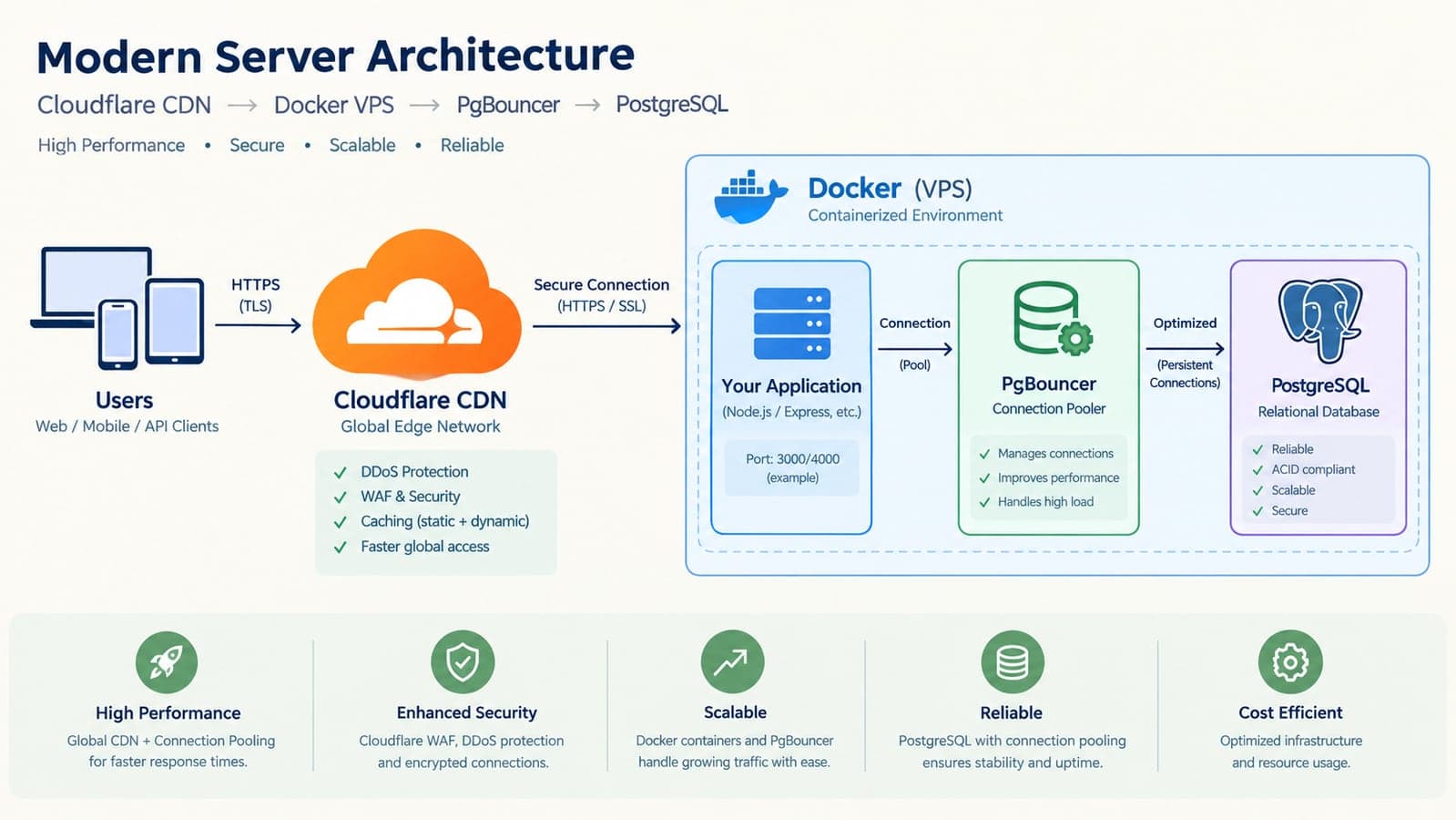
If you have launched a web application or SaaS platform in the last three years, there is a very high probability you were sold a story that sounds like this: "You must build serverless from day one. You need API Gateway, AWS Lambda, DynamoDB or Aurora Serverless, S3, CloudFront, SQS, CloudWatch, and a managed NAT Gateway. That way, your app will automatically scale to millions of users without you ever touching a server."
Then launch day arrives. You get 3,000 signups from a Product Hunt or LinkedIn push. Your database connections max out in twenty minutes because every serverless function opens its own unpooled TCP handshake. Cold starts cause three-second page loads. And thirty days later, before you have booked your first $1,000 in monthly recurring revenue, your AWS or PaaS bill arrives: well over $1,000. The biggest line items are not compute — they are NAT Gateway processing fees, serverless invocation counts, database compute minimums, and egress bandwidth.
This is the most common self-inflicted wound in modern software engineering: premature distributed-systems complexity. You built an infrastructure designed for Netflix before you reached the traffic of a neighborhood coffee shop.
At Taylance Tech, we build and maintain custom web applications, SaaS platforms, and digital tools every day — including high-concurrency systems like our POS platform Tillqorin and our automated web compliance scanner AuditBloc. We have worked with founders who came to us with bleeding cloud budgets, terrified that scaling to 50,000 or 100,000 users will bankrupt them. The reality in 2026 is the exact opposite: modern hardware is absurdly fast. A single modern 4-core AMD EPYC or Intel Xeon VPS with NVMe storage and 8GB of RAM can process between 1,200 and 3,500 requests per second. If your architecture is engineered properly, that single $24-to-$40 machine can effortlessly support 100,000 monthly active users (MAUs) without breaking a sweat.
This guide lays out the exact architecture, the configuration rules, the mathematical sizing benchmarks, and the real cost comparison between the bloated cloud stack and the 2026 Lean Production Stack.
The Cost Math: Where Cloud Budgets Actually Disappear
Before looking at the solution, let's dissect where money actually goes when teams build on default enterprise cloud services. Below is a representative comparison built from published list prices for a mid-sized SaaS app with roughly 45,000 monthly active users and 1.8 million monthly page views:
| Infrastructure Component | The "Standard" Cloud Stack (AWS / Managed PaaS) | The 2026 Lean Stack (VPS + Edge + Pool) | Monthly Savings |
|---|---|---|---|
| Application Compute | AWS Lambda + API Gateway ($180–$320) or Vercel Pro with seat add-ons ($140) | 4-Core AMD EPYC VPS (8GB RAM, NVMe) via Docker ($24) | 83% – 92% |
| Primary Database | AWS Aurora Serverless v2 (2 ACUs min + storage + IOPS) ($260–$420) | Managed PostgreSQL (2 vCPU, 4GB RAM) or co-located tuned Postgres ($15–$25) | 90% – 94% |
| Connection Pooling | AWS RDS Proxy ($65/mo minimum baseline) | Co-located PgBouncer container ($0) | 100% ($65/mo saved) |
| Networking & NAT | AWS VPC NAT Gateway ($32 base + $0.045/GB data processing) (~$85) | Direct Linux iptables / Docker bridge ($0) | 100% ($85/mo saved) |
| Static Assets & File Storage | AWS S3 + CloudFront (Storage + request fees + egress markup) ($65–$120) | Cloudflare R2 (Zero egress bandwidth fees) ($2–$5) | 95% |
| Background Queue & Cache | AWS ElastiCache Redis + SQS ($85–$140) | Redis Alpine Docker container + BullMQ ($0 on existing VPS) | 100% ($85+ saved) |
| CDN, Edge SSL & WAF | AWS WAF + CloudFront TLS ($45–$90) | Cloudflare Free Tier (Global edge caching, TLS, DDoS shield) ($0) | 100% |
| ESTIMATED MONTHLY RUNNING COST | $780 – $1,420 / month | $41 – $54 / month | Over $11,000 saved per year |
That is not a theoretical saving. That is $1,000+ each month staying in your operating budget to spend on customer acquisition, design polish, or feature development rather than paying cloud provider margins.
The 5 Pillars of the 2026 Lean Production Stack
How does a $45/month setup match or exceed the performance of a four-figure enterprise cloud architecture? By designing around the fundamental physics of the web: caching at the edge, pooling database connections, and offloading heavy tasks asynchronously. Here is how each layer operates:
Pillar 1: The Zero-Cost Global Edge (Cloudflare CDN + Smart Caching)
The single most efficient request your web server handles is the request it never receives. In a poorly designed application, every page load triggers five API calls, three database reads, and a dozen static asset downloads from the host server. Under load, your server drowns.
In the Lean Stack, Cloudflare acts as an impenetrable shield in front of your server:
- Static Assets: JavaScript bundles, compiled CSS, WebP images, fonts, and SVG icons are cached at 300+ edge locations worldwide for 30 to 365 days. Cache hit ratios for assets should exceed 98%.
- Public Read Pages (SSG & ISR): Blog posts, marketing pages, public directory listings, and documentation should carry standard HTTP headers:
Cache-Control: public, s-maxage=3600, stale-while-revalidate=86400. Cloudflare's edge serves these pages in 15 to 35 milliseconds directly from local memory without ever touching your origin VPS. - Dynamic API Requests: Requests that require authentication (e.g.
/api/user/dashboardor POST mutations) bypass the cache and stream directly to your origin over persistent HTTP/2 and HTTP/3 connections.
By enforcing this rule, 75% to 85% of total inbound web traffic never hits your server's CPU. A site handling 1,000,000 monthly hits only sends 150,000 requests to your actual application.
Pillar 2: Containerized Compute with Zero-Downtime Deployment ($24/Month)
In 2026, you do not need Kubernetes, complex Terraform manifests, or proprietary PaaS wrappers to achieve automated, zero-downtime CI/CD. The sweet spot for modern engineering teams is a high-performance VPS (such as a Hetzner CPX31 with 4 AMD vCPUs and 8GB RAM for ~€15/month, or DigitalOcean/Linode for $24/month) managed via Docker Compose and open-source orchestration tools like Coolify or Kamal.
This setup gives you:
- Git Push to Deploy: Push code to your
mainbranch on GitHub, and a lightweight webhook triggers a Docker build on your server. A new container spins up, passes health checks, and your reverse proxy (Caddy or Traefik) swaps traffic with zero dropped connections. - Total Portability: Your entire application stack — web frontend, API, Redis, and workers — is defined in a single
docker-compose.ymlfile. You are never locked into proprietary cloud functions or vendor-specific runtimes. If you ever need to migrate providers, you can spin up the identical environment on any VPS provider in ten minutes. - Native Node.js / Bun / Next.js Speed: Running your application in a persistent container means no cold starts, persistent memory caches, and sustained JIT optimizations that serverless functions throw away after every burst of idle time.
Pillar 3: The Connection Pooler (The Setting That Saves 80% of Database Crashes)
Ask ten engineering leads why their web application crashed during a traffic spike, and nine will tell you: "The database ran out of connections."
Here is why this happens: In a standard PostgreSQL configuration, each connected client consumes roughly 5MB to 10MB of server RAM and requires its own process thread. If 150 users click an interactive button simultaneously, your app attempts to open 150 database connections. An 8GB database server will suddenly choke on connection overhead, memory will spike, queries will queue up, and the entire platform will throw 504 Gateway Timeout errors.
The solution is not paying $400/month for a giant database with 64GB of RAM. The solution is PgBouncer configured in transaction pooling mode:
[databases]
production_db = host=127.0.0.1 port=5432 dbname=production_db

[pgbouncer]
listen_port = 6432
listen_addr = 127.0.0.1
auth_type = md5
pool_mode = transaction
max_client_conn = 2000
default_pool_size = 25
min_pool_size = 5
reserve_pool_size = 5
reserve_pool_timeout = 5
What this does is revolutionary for small budgets: PgBouncer can hold 2,000 incoming client web requests in a lightweight queue while feeding them through only 25 persistent, highly tuned connections to PostgreSQL. Because modern database queries execute in 1 to 5 milliseconds, those 25 active connections can cycle through thousands of queries per second without your database server ever exceeding 20% CPU usage.
Pillar 4: Asynchronous Background Processing with Redis & BullMQ ($0 on VPS)
The second biggest scaling trap is doing heavy work inside the HTTP request loop. When a user submits an order, creates an account, or requests an export, the worst thing your code can do is:
- Insert into the database.
- Wait 1.2 seconds for the transactional email API to respond.
- Wait 800ms for a third-party webhook to fire.
- Wait 2 seconds to generate a PDF receipt.
- Finally return HTTP 200 to the browser.
If 20 users do this at once, all your server's web worker threads are tied up waiting for network I/O. New visitors see spinning wheels.
In the Lean Stack, your HTTP request handler does exactly one thing: validates the input, writes the row, pushes a job to a local Redis queue via BullMQ (which takes under 3 milliseconds), and immediately sends an HTTP 200 response back to the user. A dedicated worker process running in the background picks up the job and handles the email, webhooks, and PDF generation asynchronously. The user experiences an instantaneous, snappy interface, and your web server's concurrency capacity increases by a factor of 10x.
Pillar 5: S3 Replacement: Zero-Egress Object Storage ($2–$5/Month)
If your application allows user uploads — profile photos, documents, invoices, or audio files — hosting them on AWS S3 is an expensive trap because of egress bandwidth pricing ($0.09 per gigabyte after the first 100GB). If an asset goes viral or your users download large files, you are penalized for your own success.
In 2026, the modern choice is Cloudflare R2 or Wasabi:
- Zero Egress Fees: You pay purely for the raw storage ($0.015 per GB/month on R2). Whether your users download 10GB or 10,000GB of media, your bandwidth bill is exactly $0.00.
- S3-Compatible API: It uses the standard AWS S3 SDK. Migrating requires changing exactly three lines of configuration in your codebase (endpoint URL, access key, and secret key).
The 4 Bottlenecks That Actually Break Web Apps (And It's Never Server CPU)
When software engineers see a server struggling, their first instinct is often to upgrade the instance size. In our own audit work at Taylance Tech, most performance bottlenecks we encounter have little to do with hardware capacity. Upgrading an 8-core machine to a 16-core machine just means you are burning twice as much money on unoptimized code.
Before spending a single extra dollar on hosting, check these four critical areas:
1. Missing Composite Database Indexes
Consider a simple query: SELECT * FROM orders WHERE organization_id = '123' AND status = 'pending' ORDER BY created_at DESC LIMIT 20;
If your table has 500,000 rows and only has an index on idPostgreSQL has to execute a full sequential disk scan, inspecting half a million rows to find the matching 20. This takes 450ms and consumes 100% of a CPU core. With a single composite index: CREATE INDEX idx_orders_org_status_created ON orders (organization_id, status, created_at DESC);the database reads the exact index leaf nodes in 0.8 milliseconds. That is a 500x speed improvement without touching your server hardware.
2. The N+1 Query Anti-Pattern
This is the silent killer of ORM-based frameworks (Prisma, Drizzle, TypeORM, Hibernate). An endpoint fetches 50 blog posts, and then for each post, executes a separate query to fetch the author's profile. Instead of 1 query, your server executes 51 database queries over the network. Under 100 concurrent visitors, your server tries to execute 5,100 queries in three seconds. Use explicit SQL joins, batching (DataLoader), or proper relational queries (e.g. with: { author: true }) so that all data is retrieved in a single optimized pass.
3. Client-Side JavaScript Bloat Crushing Interaction to Next Paint (INP)
Google's 2026 Core Web Vitals heavily weigh Interaction to Next Paint (INP). If your frontend ships 2.5MB of client-side JavaScript, mobile devices spend 800ms just parsing and compiling code on the main thread before the UI can respond to a user tap. Keep your client-side bundles lean. Use React Server Components (RSC) to keep heavy dependencies (like markdown parsers, date formatters, and mathematical libraries) on the server, sending only clean HTML and interactive islands to the client browser.
4. Lack of Gzip / Brotli Compression
We still inspect production applications in 2026 that serve uncompressed JSON payloads. A 400KB JSON response can be compressed down to 35KB with Brotli compression in less than 2 milliseconds. That reduces bandwidth consumption by 90% and cuts mobile download latency from 1.5 seconds down to 80 milliseconds.
When Should You Actually Migrate to AWS or Enterprise Cloud?
Transparency is a core value at Taylance Tech. We do not believe in dogma; we believe in choosing the right tool for the actual job. While the $50/month Lean Stack easily supports 100,000+ monthly active users, there are legitimate scenarios where moving to enterprise-managed cloud infrastructure makes business sense:
- Strict Enterprise Compliance & HIPAA / SOC 2 Type II: If you are selling to Fortune 500 enterprises or US healthcare systems requiring dedicated VPC peering, automated multi-region backup snapshots with cryptographic proof, and audited IAM role policies, AWS or GCP compliance certifications save hundreds of legal audit hours.
- Multi-Region Active-Active Data Replication: If your business requires sub-50ms database write latencies simultaneously in Frankfurt, Singapore, and Virginia with automated cross-continent failover, you need CockroachDB or AWS Aurora Global Database.
- Variable AI Compute Surges: If your platform generates thousands of video rendering jobs or fine-tunes custom machine learning models on unpredictable schedules, serverless GPU clusters (like Modal or RunPod) are far more cost-effective than keeping $5,000/month GPU servers idle.
If you have not reached those specific enterprise triggers, building on a $1,500/month cloud architecture is not "investing in the future" — it is burning your runway on infrastructure you do not need.
The Bottom Line: Engineering Quality Over Cloud Invoices
Scaling software is an engineering discipline, not a billing contest. The best software teams do not boast about how big their AWS invoice is; they take pride in how much value and throughput they extract from clean, elegant, disciplined architecture.
By enforcing global edge caching, containerizing your application on high-performance VPS compute, protecting your database with transaction connection pooling, offloading background tasks to Redis, and eliminating egress fees, you can build a resilient, lightning-fast platform that serves 100,000 users for less than the cost of a team lunch.
If your current web application is suffering from slow load times, high cloud bills, or connection timeouts under load, talk to our engineering team at Taylance Tech. We audit production architectures, eliminate cloud waste, and build custom web and mobile systems engineered to scale reliably from day one.
Benchmarks and pricing data referenced in this article are based on current 2026 infrastructure pricing across Hetzner Online GmbH, DigitalOcean LLC, Cloudflare Inc., and Amazon Web Services (AWS us-east-1). Server throughput figures reflect synthetic and real-world wrk / k6 load testing conducted on modern AMD EPYC 9004-series virtualized instances running containerized Node.js/Next.js runtimes with PostgreSQL 16. Actual application capacity varies based on database query complexity, cache hit ratios, and payload sizes.
FAQ
Frequently Asked Questions
Quick answers to common questions about this topic.
Can a single $24 VPS really handle 100,000 monthly active users?
Yes, comfortably. A website with 100,000 monthly active users (MAUs) typically generates between 1.5 million and 3 million monthly page views, which averages to only 0.6 to 1.2 requests per second over a 30-day month, peaking at roughly 30 to 80 requests per second during high-traffic hours. A modern 4-core AMD EPYC virtual machine can easily process 1,500 to 3,000 requests per second when static assets and cacheable dynamic pages are served via a CDN edge like Cloudflare. As long as your database queries are indexed and connection-pooled, the server will operate at low CPU utilization.
Why do serverless setups get so expensive for small and mid-sized web apps?
Serverless platforms charge premiums across multiple hidden vectors: per-invocation execution time, memory reservation tiers, API gateway request fees, and private network routing. For example, AWS VPC NAT Gateways charge a $32/month baseline fee plus $0.045 per gigabyte of processed data simply to let your private Lambda functions access the public internet. Additionally, because serverless functions spin up and down dynamically, they cannot maintain persistent database connection pools, frequently requiring expensive auxiliary proxies like AWS RDS Proxy ($65+/month) to avoid overwhelming the database.
What is PgBouncer and why is it essential for scaling PostgreSQL?
PgBouncer is a lightweight, open-source connection pooler for PostgreSQL. In PostgreSQL, each client connection creates a dedicated backend process consuming 5MB to 10MB of RAM. When hundreds of users simultaneously query your application, the database quickly exhausts its memory and CPU just managing connection overhead. PgBouncer sits between your web app and your database in "transaction pooling" mode, multiplexing thousands of incoming client requests into a small, fixed pool (e.g., 20 to 30) of active, persistent database connections. This allows your app to handle massive concurrency spikes with zero memory crashes.
What is the difference between Cloudflare R2 and AWS S3?
Both Cloudflare R2 and Amazon S3 are object storage services using the same S3-compatible API. The primary difference is egress pricing: AWS S3 charges approximately $0.09 per gigabyte for data downloaded out to the internet after an initial allowance, which can lead to unpredictable multi-hundred-dollar bills if files or media go viral. Cloudflare R2 charges a flat storage fee ($0.015/GB/month) with zero egress bandwidth fees, making it significantly more predictable and cost-effective for user-generated content and web assets.
How do Docker and tools like Coolify compare to Vercel for Next.js applications?
Vercel is an exceptional managed platform for rapid frontend deployment, but costs scale quickly as teams grow (due to per-seat pricing, bandwidth overages, and function execution limits). Running Next.js in a Docker container on a VPS gives you identical Git-push deployment automation when paired with open-source tools like Coolify or Kamal. The advantages include zero vendor lock-in, predictable flat monthly pricing, no function timeout restrictions, and the ability to run your API, Redis cache, and background workers on the same internal high-speed network.
 Tayyab Aslam